|
Micca Slim Portable HDD Digital Media Player
Price: $44.95 & eligible for FREE Ground Shipping on orders over $99.00!
|
|
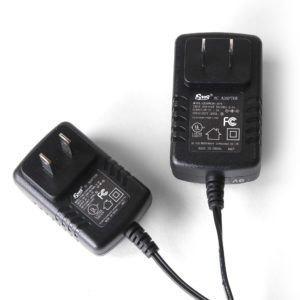
Car Power Adapter:
|

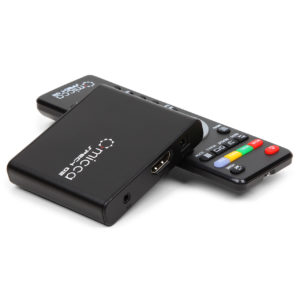
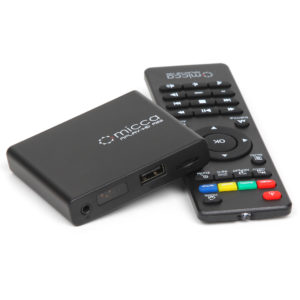
The Micca Slim digital media player provides convenient and portable playback of videos, music, and photos on any TV or HDTV! It has a 720P HDMI output for sending sharp and clear video and audio in pure digital format to HDTVs, as well as composite AV output for use with analog TVs.
Small and sleek, the Micca Slim is a perfect entertainment source for vacations and business trips. Its aluminum exterior is tough enough to withstand the rigors of portable use. With the optional car power adapter, the Micca Slim can be used to play movies on in-car video system and keep everyone entertained on trips short and long.
The Micca Slim is also popular as a simple digital signage device with its HDMI and Analog-AV interfaces and fault tolerant features such as auto power-on and resume, and multi-file continuous loop.
- 720P high definition HDMI pure digital video and audio output
- Newest generation hardware to playback a wide range of media formats
- Fast, responsive, and easy to navigate user interface
- Conveneint auto resume and continuous multi-file playback
- Internal 2.5" SATA HDD drive bay for up to 750GB of storage (HDD not required for use)
- Play media files from external USB hard drives, thumb drives, or SD/SDHC flash cards
- Functions as portable hard drive with internal HDD installed
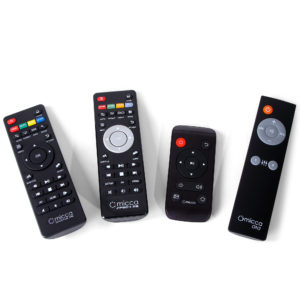
- Full function IR remote control in addition to on-device buttons
- Ultra compact and portable for use in the home or on the go.
What's Included:
- Micca Slim HDD Media Player
- IR Remote Control
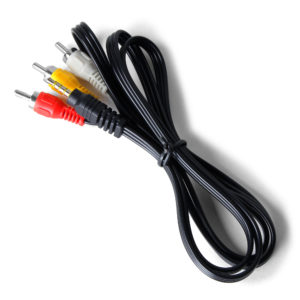
- 3.5mm to 3 RCA AV Out Cable
- 110-240V AC Adapter
- Hard Drive Screws and Tool
| *.AVI |
MPEG4, DivX, Xvid |
MP3, AAC, PCM |
720 x 576 Max |
| *.MP4, *.MOV |
MPEG4 |
AAC, OGG |
| *.VOB (DVD) |
MPEG2 |
MPEG, PCM |
| *.MPG, *.DAT |
MPEG1/2 |
MPEG MP3 |
| *.RMVB, *.RM |
RealVideo |
RealVideo, AAC, MP3 |
1024 x 576 Max |
| *.3GP |
MPEG4 |
AAC |
640 x 480 Max |
| *.MP3 |
  |
MPEG Layer-3 |
32kbps-320kbps |
| *.WMA |
  |
Windows Media Audio |
32kbps-192kbps |
*.JPG, *.GIF *.BMP, *.PNG |
  |
  |
JPG 7800 x 5280 Max |
Not Supported: H.264/AVC, VC-1, WMV, MKV - Please see the Micca Video Recode Tutorial for more info.
What's Included:
- Micca Slim HDD Media Player
- IR Remote Control
- 3.5mm to 3 RCA AV Out Cable
- 110-240V AC Adapter
- Hard Drive Screws and Tool
Own this product?
Average Rating:
 (7 reviews)
Result Pages: 1
Displaying 1 to 6 (of 7 reviews)

Date Added: Wednesday 15 December, 2010
I purchased the Micca as a compact, travel media player for my children’s videos. I was tired of spending good money on DVDs only to have them scratched up. What’s nice about this is that once the files are on the hard drive all I have to do is grab it and go hook it up to in the van TV. No more gathering piles of DVD’s for trips!
To date I’ve used DVD Fab or DVD Shrink on most of my videos creating VOB files. On my laptop I use VCL media player which plays them flawlessly. However on the Micca, you can’t just play the main folder like with VLC. Instead you have to navigate into the Video folder and play the first chapter but it would be easier if you could just play the main folder. A friend recently suggested using WinX DVD Ripper to convert the VOB files to AVI files which may make it easier to navigate. Another issue with VOB’s is with every chapter change the video glitches momentarily until the next chapter plays. I assume this issue may also go away when I rip the files into AVI format. Also if you rip a DVD including the subtitles, Micca auto starts the subtitles on every chapter (or movie) and you have to keep turning it off. Again this issue may go away when I rip the files into AVI format. Either way the subtitles shouldn’t come on automatically which is a mistake with Micca. I hope to try the conversion in the near future and report.
I saw other reviewers mentioned that the Micca gets pretty hot which it does. The internal drive is not vented and so a regular HHD generates quite a bit of heat. I have a 500 GB Hittachi drive in it and so far it’s handled the heat ok. I’ve wondered since my purchase if I should have purchased a Solid State Drive instead, which in theory should be cooler since it doesn’t have any moving parts but in contrast it’s much more expensive. I’ve considered drilling some small holes in the cover to help vent the unit but I’m sure it will void the warranty. I’m only using composite out so I can’t imagine what HDMI out will do to it.
Other than heat my biggest issue has been that the audio level is extremely low. I’ve been told there may be firmware mods that may help but as of this writing I have not yet found any. If I do I will post again.
Included documentation was minimal but adequate for the startup. Overall, I am happy with my purchase. Previous to my purchase I had planned on purchasing an Argosy HV256T player that was similar but the Micca provides more features for much less cost. In contrast, the Argosy came with a nice case to keep it all in whereas the Micca came with just the hardware and a few wires. I had to buy the car adapter separately.
Pros
- Compact Travel Media Player
- Holds an internal hard drive up to 750 GB!
- Plays multiple sources including flash drives and SD cards
- Plays multiple file formats – but wish there were more
- Play and menu buttons on the device – in case the remote is lost or left behind
- Easy Menus
- Video picks up where it left off when turned off
- Both Component A/V and HDMI
Cons
- Audio output is too LOW
- Gets hot – no vent or fan
- Does not come with standard car charger
- Won’t play VOB files correctly
- VOB files glitch on every chapter
- Subtitles auto start on every chapter
- No organized carrying case like the Argosy HV256T
Date Added: Sunday 12 December, 2010
I really love this little media player. It takes a bit of time to learn how to use all of its features properly and to learn how to transcode audio and video codecs so that the device will play them properly (I find that the mp4 container format works best), but if you are not comfortable with transcoding media you should probably not have a mediia player of this type. Also the power adapter which ships with the unit is of very poor quality. I have gone through three of these in 9 months. Micca is aware of this problem and will sell you a better quality adapter for the unit (aftermarket) if you request them to. I have two of these devices. I use one as a 2.5" SATA HD enclosure to interface backup drives to my computer, and as a backup media player in case the one I have hooked up to my TV fails. I transcode YouTube, political, and comedy videos into an mp4 canister format, usually with either an H-264 or mp4 video codec and an mp4 audio codec, carry them home on my cell phone or on a flash drive, transfer them to my media player, and watch them at home on my TV. These media players can be connected to one another in such a way that the media player which is hooked up to your TV can transfer files back and forth from and play files on a second media player which is connected as an external hard drive to the primary player.
As much as I like this media player, I especially like the company that sells it. They give you personal service when you have problems with the unit. I thought that my first one had died in about three months, when the power adapter failed. One of the customer service people at Micca put in a lot of effort working with me to figure out that the problem was the power adapter and not the media player. This adapter needs to produce 5.4 - 5,6 VDC under load (ie. while the unit is powered up and working), or it will not function properly. Even though the spec sheet calls for 5.0 VDC, if the working voltage drops below 5.4 V it will play media, but not transfer files to and from external devices properly. The rep I worked with taught me how to properly test the power adapter with the unit operating to determine whether or not it was defective, and he sold me a better quality adapter when I finally got tired of replacing the low quality ones which come with the unit. This adapter is almost 3 months old now and still produces a rock-solid 4.6 V, whereas the adapters which ship with the unit show continuous slow voltage degradation after about a month of use.
In summary: good product, great company. Sturdy, reliable, compact, inexpensive, and backed by a good company. I recommend it highly.
Date Added: Thursday 04 November, 2010
This is a great product and their customer service is exceptional. The player started malfunctioning after about 45 days from the purchase. Their troubleshooting page helped me figure out that it was the AC adapter. I emailed them about the malfunction and they sent and I received a new AC adapter in about a week. The new adapter is of much better quality than the original one it came with and my player is functioning again. I will definitely buy more Micca products in the future. I am currently considering getting the new 1080p Full-HD version of the player.
Date Added: Sunday 31 October, 2010
It is very good. works well on the go. I just purchase a 500gb wd ata hdd to go with it but how do i format it to use with it.
Date Added: Wednesday 22 September, 2010
I purchased two of these little media Players and am NOT happy at all. Neither one works. One hasn't worked at all and the other worked for all of one day and now won't show up on my TV all I get is an Invalid Format when I switch my TV over to Video 2. I upgraded the firmware on the device and still no help. I have powered it on and off I have unplugged it and plugged it back in to no avail. I can play it on my computer just fine (after a lot of tme and trouble trying to get the hard drive formated and readable to windows vista, had to go into disk management to fix this problem). Right now I am giving this device a big fat ZERO due to the fact it hasn't worked yet.
Date Added: Friday 11 June, 2010
Great little media player for my truck, hotel room, Etc. Great for MP4's Great quality. I'm very happy with this product.
Steve
Result Pages: 1
Displaying 1 to 6 (of 7 reviews)
Own this product? 
Can The Micca Slim Playback Video Files Continuously?
By default, the Micca Slim will continuously play back all compatible video files in a folder repeatedly until turned off or stopped. Also, in case of a power outage, the Micca Slim will turn itself back on once power comes back and resume playing the video where it left off. This feature is extremely convenient for use while traveling and also allow the Micca Slim to be used as a simple digital signage device.
Why doesn't the Micca Slim support MKV, H.264 or 1080P?
The Micca Slim is a general purpose player designed to be affordable. For most everyday use such as playing DVD backups, movies from digital cameras, the MPEG4/DiVX video formats supported by the Micca Slim provides excellent results.
How do I make sure that the videos I have will play on the Micca Slim?
The Micca Slim supports most of the commonly used codecs and container files in use today. However, even when you run into a video file that the Micca Slim reports as "unsupported", all is not lost. It is easy to recode such videos into a format that can be played back on the Micca Slim. We have put together a tutorial that will show you how to recode videos using free and easy to use software tools like MediaInfo and Handbrake:
Micca Slim Video Recode Tutorial
Can The Micca Slim Be Used Without a Hard Drive?
An internal hard disk drive is strongly recommended but not required to use the Micca Slim. The internal drive bay can be left empty and only playback files from external USB or SD/SDHC card storage devices.
-
images/gallery/1/1.jpg
-
images/gallery/1/2.jpg
-
images/gallery/1/3.jpg
-
images/gallery/1/4.jpg
-
images/gallery/1/5.jpg
-
images/gallery/1/6.jpg
-
images/gallery/1/7.jpg
-
images/gallery/1/8.jpg
|